Equine Pre-Purchase Exams and PACS: What the Imaging Workflow Actually Needs
Summary
A pre-purchase exam puts four constraints on an imaging system at once: the images are acquired in a barn or a sales facility, the network there is unreliable or absent, the radiologist reading the study is somewhere else, and the buyer's veterinarian works at a different practice altogether. This post takes each constraint in turn and shows where purpose-built equine imaging software has to do the work, from the first exposure to the shared report.
What makes equine pre-purchase imaging different?
Most veterinary imaging workflows assume a clinic. There is a fixed network, one practice using the images, and a radiologist down the hall or at least inside the same organisation. A pre-purchase exam breaks every one of those assumptions.
The acquiring veterinarian works wherever the horse is. Network coverage ranges from patchy to none. The horse belongs to a seller, the buyer's veterinarian works at a separate practice, and the radiologist may be in a third location. When the deal closes, several parties need the same study at the same time, with no doubt about which horse and which exam date it belongs to.
Generic PACS platforms treat this as an edge case, usually a CD-burning step or a file-transfer workaround bolted onto a small-animal workflow. Equine practice has its own requirements, which we set out in why equine PACS requirements differ from general practice systems. The rest of this post walks through the four constraints.
How does field capture work without a reliable network?

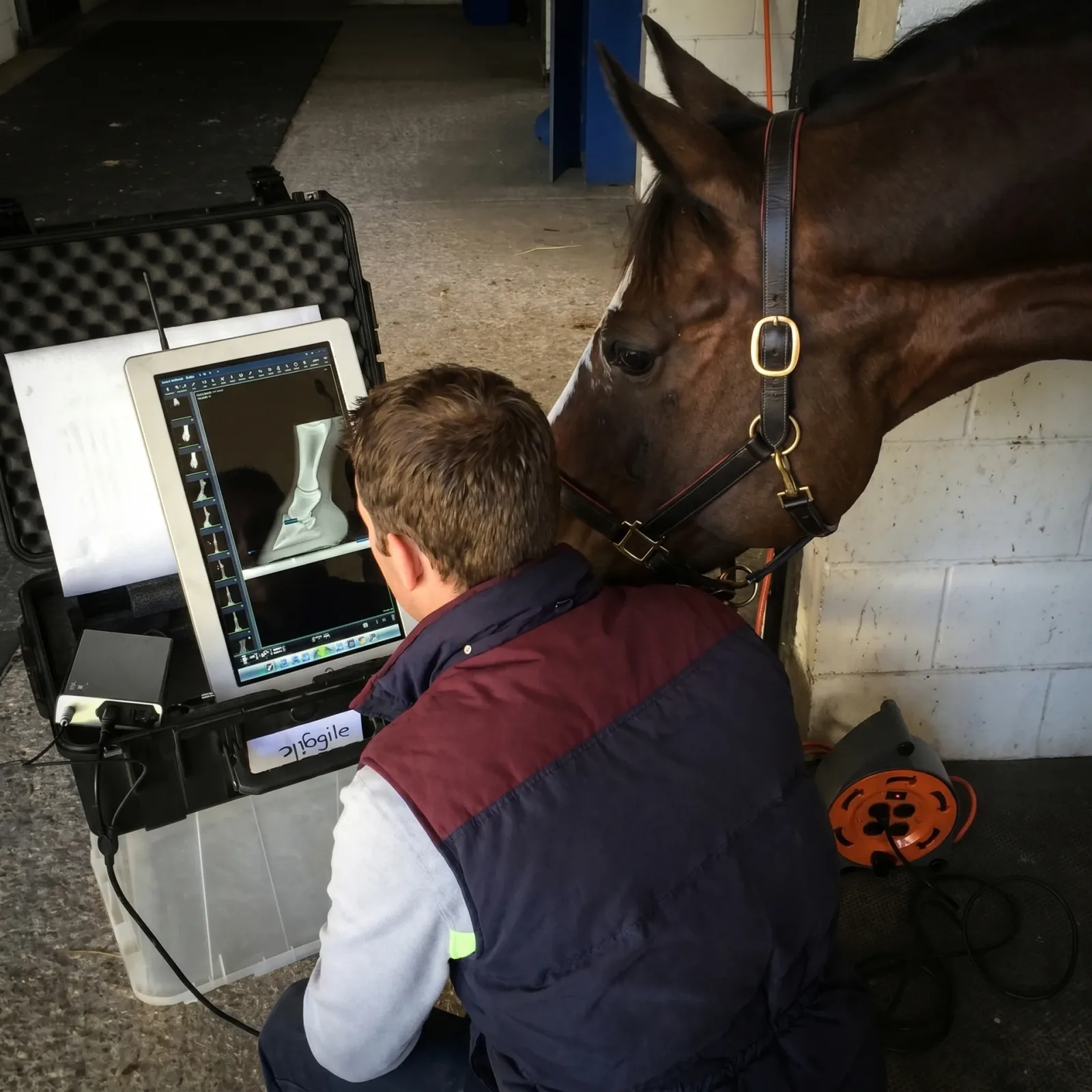
The first constraint is acquisition. A pre-purchase exam can run to 30 to 60 exposures on one horse: all four limbs, the feet, often the cervical spine. Every one of those images has to be captured, stored and filed against the right patient even if the barn's wifi drops halfway through or there is no signal at all.
Keystone Omni is a hybrid PACS. Studies live on the practice's own server for local speed and in the Asteris cloud for access from anywhere, and images stay available even when the internet connection goes down. In the field, the acquisition laptop holds the full study with the patient details attached. As soon as it is back on a network, Keystone's patented transfer protocol moves the complete study to the local server and the cloud archive in the background, about three times faster than a standard DICOM send, and verifies that every image arrived. Nobody has to remember to upload, and nobody has to check that image 47 of 52 made it.
That is the practical difference between a hybrid architecture and a cloud-only one. A cloud-only platform needs a live connection to do its job; when the barn drops offline it either stalls or fails quietly, and the vet finds out later that the study is incomplete. Cloud, on-premise or hybrid veterinary PACS goes into the trade-offs in detail.
How does the radiologist review a pre-purchase study remotely?
Once the study is archived, someone has to read it, and in a pre-purchase context that someone is rarely in the same building. The read also tends to be time-sensitive, because a sale is waiting on it.
For an in-house or contracted radiologist, NewLumen is the reading environment. The study appears in a worklist, the radiologist opens it in Chrome or Edge with nothing to install and no VPN, and reads the full-resolution DICOM study with hanging protocols already applied. That holds whether the read happens at a home office, at a remote clinic or in another time zone.
Routing is configurable. A group that handles equine pre-purchase work can send those cases to an equine radiologist by rule rather than by hand, separate from the general small-animal queue, and urgent studies surface first. The teleradiology worklist and routing page explains how assignment, priority and billing roll-up work.
The report is drafted with Report Assist, which structures the Findings, Impression and Recommendations sections for the species and modality. The radiologist makes every clinical observation and every diagnostic judgment, then signs. For a pre-purchase exam, where the written report carries financial and sometimes legal weight, that is the right division of labour: the software organises, the radiologist decides.
Practices that already use Keystone Omni have a simpler path for consults. A study can be sent to Keystone Community for a teleradiology read from inside Omni, with the same login and the same viewer, and the report comes back into the patient record.
How do pre-purchase exam images reach the buyer's veterinarian?
The buyer's veterinarian is the third party in this workflow and the hardest access problem. They work at another practice, they may have no relationship with your imaging platform, and they will not install a viewer or request credentials just to look at one horse.
Keystone Omni handles this with one-click sharing. The sending practice picks the study and sends it to a client, a referring vet or a radiologist. The recipient opens it in a browser, with no account and no software, and can download the DICOM files or JPEGs if their own system needs them. One link, one email, the whole image set.
For sales and auctions the Keystone Equine Repository goes a step further. Radiographs and reports are uploaded to the repository from anywhere, and consignors, buyers and their veterinarians are sent links to the organised study. Everyone involved in the sale looks at the same images and the same report, which removes the back-and-forth that usually slows a transaction down.
Either route replaces the CD in the post or the proprietary file-transfer link that needs its own viewer. The buyer's vet sees the study in the browser they already have open.
Does the whole workflow hold together?
Yes, and each part is a product you can see today. In sequence:
- Field acquisition on the practice's Keystone Omni PACS, with images held locally when there is no connection.
- Automatic, verified transfer to the local server and the cloud archive when connectivity returns.
- A remote read in NewLumen, routed to the right radiologist by rule, or a consult through Keystone Community from inside Omni.
- A structured report, drafted with Report Assist and signed by the radiologist, filed against the patient record.
- One-click sharing to the buyer's veterinarian, or repository links for a sale, with nothing for the recipient to install.
If you are checking whether your current setup covers all five steps, what is veterinary PACS software explains the architecture underneath them, and the integrations page lists the practice management and teleradiology connections Keystone supports. Most equine practices settle infrastructure decisions in the run-up to the AAEP Annual Convention in December, ahead of the next buying season, which is a sensible time to close any gaps.
Frequently Asked Questions
What equine imaging software handles field capture without an internet connection?
Keystone Omni is a hybrid PACS: studies are stored on the practice's own server and in the Asteris cloud, and images remain available when the internet goes down. Images acquired in the field are held with their patient details and transferred automatically, with verification, when the acquisition system is back on a network.
How does a veterinarian share pre-purchase exam images with a buyer's vet?
From Keystone Omni, the practice sends the study with one click. The buyer's veterinarian opens it in any browser without creating an account or installing software, and can download DICOM or JPEG copies. For sales and auctions, the Keystone Equine Repository provides links to the organised study and report for consignors, buyers and their veterinarians.
Can a radiologist read equine pre-purchase studies remotely using NewLumen?
Yes. NewLumen runs in Chrome or Edge with nothing to install and no VPN, so the radiologist reads the full-resolution study from home, a remote clinic or another time zone. Routing rules send equine cases to the right radiologist and surface urgent studies first.
Does AI write the pre-purchase report?
No. Report Assist in NewLumen drafts the structure and pre-populates sections for the species and modality. The radiologist makes all clinical observations and diagnostic judgments and signs the final report.
Does Keystone work with the practice management system an equine practice already uses?
Keystone Omni integrates with a range of practice management systems and teleradiology providers, so studies can be ordered from the PMS and images and reports appear back in the patient record. The integrations page lists current partners.